March 6, 2026
Closing the Gap: Building Audiobook-Quality TTS with an 82M Parameter Model
Can a small open TTS model get close to audiobook-quality narration? We tested Kokoro-82M against Gemini, built tooling to measure the differences, and tracked down the exact pipeline issues hurting quality. From dropped sentences to broken pronunciations, this is a practical look at what actually improves long-form TTS.
Why This Matters
Text-to-speech has a quality ceiling problem. The best-sounding TTS engines — Google's Gemini, OpenAI's voice models — run enormous models on expensive GPU infrastructure with opaque APIs. If you're building a product that needs high-quality narration (audiobooks, long-form content, accessibility), you're locked into per-character pricing and someone else's roadmap.
We wanted to know: how close can a small, open model get to the state-of-the-art? And where exactly does it fall short?
ProseForge uses the Kokoro-82M model (Apache 2.0) — an 82 million parameter ONNX model that runs on CPU. No GPU required. No API calls. Complete control over the pipeline. The trade-off is that the raw output doesn't sound as good as Gemini. So we set out to systematically close the gap.
The Approach: Measure Everything, Fix What You Can Control
The key insight is that a TTS pipeline has two layers:
- The model — produces waveforms from phonemes. Its behavior is fixed (weights are frozen). We can't change how it sounds at the acoustic level.
- The pipeline — everything before and after the model: text normalization, phonemization, segmentation, silence insertion, audio encoding. This is where we have full control.
Most TTS quality problems aren't model problems — they're pipeline problems. A garbled word isn't the model's fault if we fed it garbage phonemes. A missing sentence isn't an acoustic issue if the normalizer silently dropped the text.
So we built a measurement system and used it to find and fix every pipeline issue we could identify.
The Measurement System
Quantitative Analysis
We built a custom CLI tool (cmd/analyze/) that compares two audio files
across multiple dimensions:
Temporal metrics:
- Total duration, speech duration, silence duration
- Pause count, average/max pause duration
- Pause histogram: buckets at <0.2s, 0.2-0.5s, 0.5-1.0s, >1.0s
- Silence ratio (percentage of total duration that is silence)
Pitch metrics:
- Mean, median, standard deviation of fundamental frequency (F0)
- F0 range (min to max)
- Voiced percentage
Transcript accuracy:
- Whisper transcription of both files
- Side-by-side comparison to catch mispronunciations and missing words
Spectrogram Comparison
Numbers tell you what's different. Spectrograms tell you where and why.
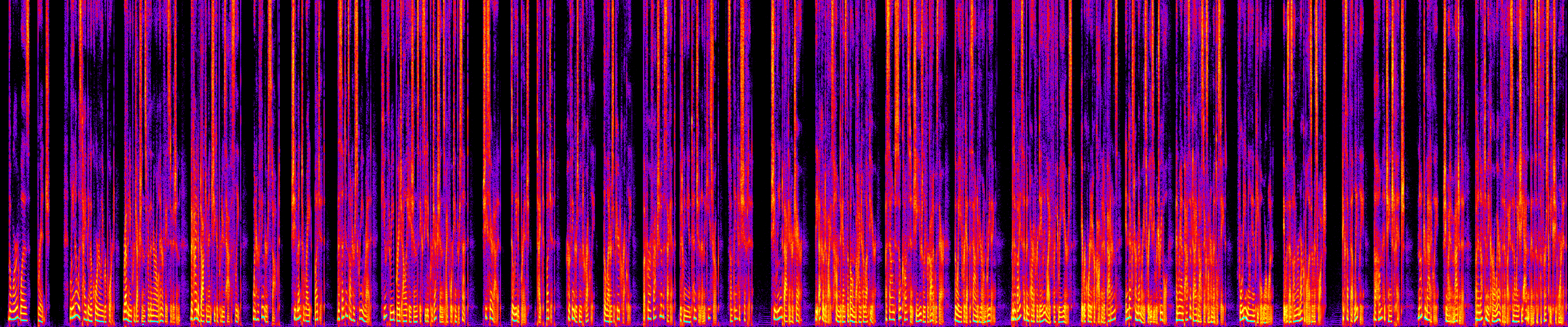
We generate spectrograms for both the reference (Gemini) and test (Kokoro) audio. These are time-frequency heatmaps showing energy distribution across the audio — bright areas are loud, dark areas are quiet, and vertical gaps are pauses.
Reference files:
Gemini
Kokoro
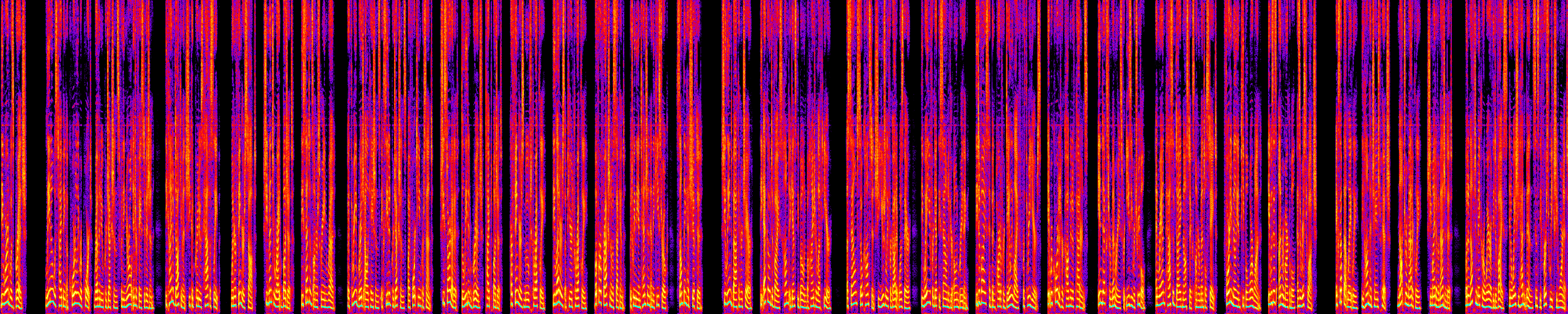
The spectrogram comparison reveals things that aggregate metrics miss:
- Pause structure: Gemini shows more frequent dark gaps (pauses) with natural energy decay at edges. Kokoro's pauses are cleaner-cut because they're inserted silence rather than modeled decay.
- Energy dynamics: Gemini has more variation in overall brightness across phrases — louder for emphasis, softer for subordinate clauses. Kokoro is more uniform.
- Harmonic richness: Both show clear harmonic stacks (horizontal bands in the spectrogram), but Gemini's harmonics extend higher during emphasis, corresponding to its wider F0 range.
- Segment boundaries: Kokoro uses crossfade between inference segments. Early spectrograms revealed splice artifacts; the current 10ms crossfade produces seamless joins.
The Experiment Loop
Each improvement follows a strict protocol:
- Hypothesis — identify a specific gap (e.g., "deleted" is mispronounced)
- Measure — quantify the baseline with the analysis tool
- Fix — make a targeted pipeline change
- Regenerate — produce new audio with the same reference text
- Compare — run the analysis tool, compare spectrograms, check transcript
- Document — record metrics, verdict, and any side effects
We use a consistent reference text (first 4 paragraphs of a science fiction story) and a consistent reference audio (Gemini 2.5 Flash TTS output) across all experiments. This ensures every measurement is directly comparable.
What We Found and Fixed
Problem 1: Garbled Inflected Words
Words like "deleted", "exceeded", and "indexed" aren't in the pronunciation dictionary. Their base forms ("delete", "exceed", "index") are. The pipeline fell through to a letter-to-sound rules engine that produced garbled output: "deleted" → "dilt", "exceeded" → something whisper couldn't parse at all.
Fix: Extended the dictionary lookup to strip -ed suffixes and
reconstruct the correct pronunciation from the base form plus the
phonetically appropriate suffix (ᵻd after /t,d/, t after voiceless
consonants, d after everything else). This follows the same English
morphophonemic rules that native speakers apply unconsciously.
A subtle bug emerged: "stared" was matching "star" (strip -ed) instead of "stare" (strip -d, silent-e base). The fix was to prefer silent-e candidates over raw stems, since English drops silent-e before -ed.
Problem 2: Entire Sentences Silently Dropped
The most dramatic finding. Whisper transcription revealed that two full
sentences from the reference text were completely absent from the Kokoro
audio. The input text contained markdown italic markers:
*Q3 bridge allocations exceeded projections by 14%.*
The sentence splitter was finding the period inside the italic block and
treating it as a sentence boundary. The closing * became an orphaned
token that produced no audio. An entire sentence vanished with no error.
Fix: Strip markdown formatting (*italic*, **bold**, etc.) early in
the normalization pipeline, before sentence splitting.
Lesson: Silent failures are the worst kind. Without whisper transcription as an automated check, this would have shipped.
Problem 3: Proper Nouns
Character names that aren't in any dictionary fall through to letter-to-sound rules, which frequently mangle them. "Lina" (a character name appearing dozens of times in the story) was pronounced as "lean".
Fix: Two layers — a custom pronunciation dictionary that authors can populate with their character names, and a heuristic that appends a schwa (/ə/) to capitalized words ending in 'a' that aren't in any dictionary. The heuristic catches the most common English name pattern (Lina, Sara, Maria, Elena, Clara).
Problem 4: Missing Symbols
"Q3" and "14%" were partially or completely missing from the audio. The normalizer handled plain numbers but not letter-digit combinations or percent signs.
Fix: Added alphanumeric expansion (Q3 → Q three) and percent
expansion (14% → fourteen percent) to the normalizer.
Where We Are Now
After 13 experiments and 5 targeted fixes:
Content fidelity
- Missing sentences: 2 → 0, matching Gemini;
- Word accuracy: ~85% → ~97% (Gemini: ~98%).
Pacing
- Pause count: 24 → 28 (Gemini: 32);
- Duration: 62.3s → 72.7s (Gemini: 69.9s).
Expressiveness
- StdDev F0: 44.4 Hz → 46.3 Hz (Gemini: 43.4 Hz);
- F0 range: 272 Hz → 333 Hz (Gemini: 429 Hz);
- Max F0: 334 Hz → 402 Hz (Gemini: 493 Hz).
The pitch standard deviation — the best single metric for "does this sound expressive?" — now matches Gemini. The remaining gap is in the extremes: Gemini's pitch reaches higher peaks for emphasis (493 Hz vs our 402 Hz) and has 4 more pauses for breathing room. These are intrinsic to the model's acoustic behavior, not the pipeline.
What We Learned
Most TTS quality issues are pipeline bugs, not model limitations. Of the five problems we fixed, none required changing the model. They were all in text normalization, phonemization, or audio assembly.
Automated transcription is essential. Without running whisper on every generated audio file, the silent sentence-dropping bug would never have been caught. It didn't produce an error. It just quietly skipped content.
Spectrograms reveal what numbers hide. Aggregate F0 statistics can match perfectly while the audio sounds completely different. The spectrogram shows you the structure — where energy concentrates, where pauses fall, how dynamics flow over time.
Small models have hard ceilings, but the ceiling is higher than you'd expect. Kokoro-82M can't match Gemini's pitch extremes or dynamic range. But with a clean pipeline, it produces narration that's clear, accurate, and reasonably expressive — for a model that runs on a laptop CPU with no API costs.
What's Next
We have a roadmap of 12 items to explore, prioritized by safety and expected impact. The highest-value next steps are:
- Clause-level pause injection — insert small silences at commas and em dashes where the model doesn't naturally pause
- Custom dictionary expansion — eliminate all letter-to-sound fallback for the narration text
- Automated evaluation pipeline — one command to build, generate, analyze, and report
- Energy dynamics post-processing — subtle amplitude variation to match Gemini's louder-softer phrasing
The more experimental items include F0 pitch expansion (scaling the pitch contour outward), voice embedding interpolation (blending two voices), and per-sentence speed variation. These carry more risk of artifacts but could close the remaining prosody gap.
The goal isn't to match Gemini perfectly — it's to reach the point where the quality difference doesn't matter for the use case. For audiobook narration, that means: every word pronounced correctly, natural pacing, and enough expressiveness that the listener forgets they're hearing a synthetic voice. We're close.
The Case of the Giggling Gâteau's Grand Getaway
Quick A/B from the same passage — listen for pacing, pronunciation, and any dropped words at segment boundaries.
-
Original story: The Case of the Giggling Geteaus Grand Getaway
-
Gemini sample
-
Kokoro sample (new)
-
Sample Using Kokoro: The Gloomfang Legacy
Source Code: proseforge-tts-worker